Add Assets to Meta Business Suite: 3 Routes, Step by Step, Without Losing Page Ownership (2026)

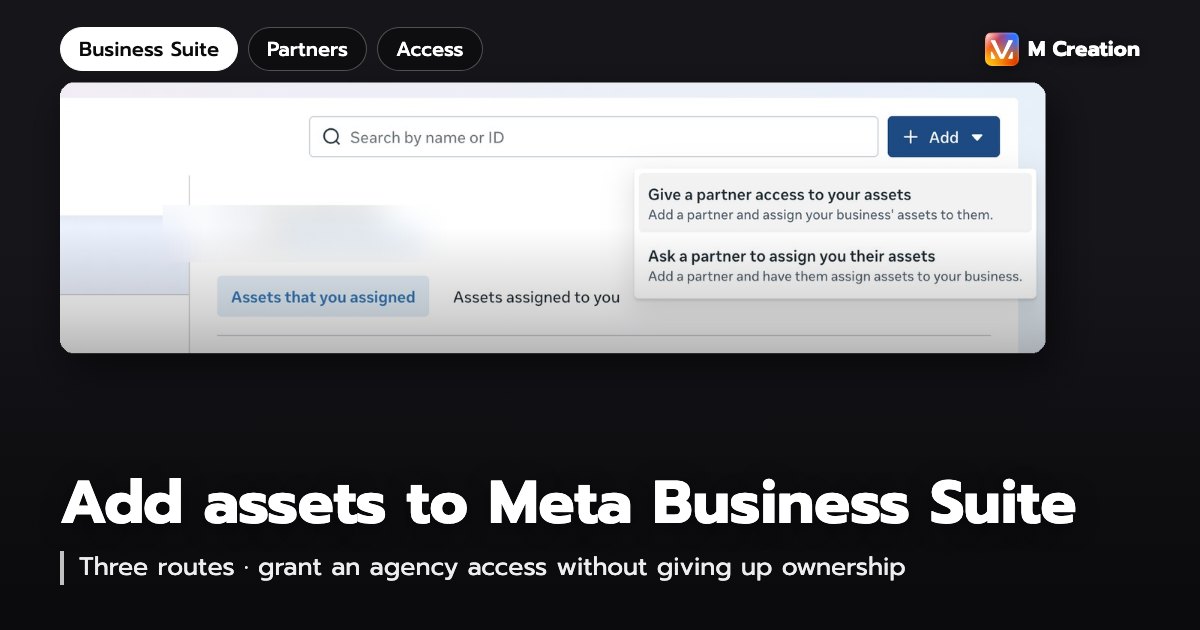
Adding an asset to Meta Business Suite means putting a Page, ad account, Instagram account or dataset inside a business portfolio, so that access for every person and agency is managed from one place. There are three ways to do it: add an asset you already own, request access to one that sits in someone else’s portfolio, or link the two businesses as partners and hand over assets one at a time. All three start in Settings. What changes is the menu you click and who has to approve.
This guide walks through each route with the real screens, and covers the step almost everyone misses — adding a partner does not give them anything until you assign assets, which is why so many agencies report that they still cannot see the account. If you are a business owner about to hand an agency the keys, read the Route C section: you can grant exactly what they need without giving away the account.
What counts as an asset in Business Suite
Meta calls the things a business owns business assets. These are the ones you can put into a business portfolio:
- Facebook Pages — the most common one, because it drives both ads and the inbox
- Ad accounts — the one with the strictest rules: an ad account can belong to only one portfolio
- Instagram accounts — you have to be logged in to the account while adding it
- Datasets (pixels) — where website events land, and what the Conversions API points at
- Catalogues, WhatsApp accounts, apps and Threads accounts — fewer businesses need these, but the steps are identical
One naming note: Business Manager and Meta Business Suite are now the same place. Meta folded the old settings area into Business Suite and renamed a business account to a business portfolio. Old Business Manager links land on the same Settings screen.
Three routes — pick by who owns the asset
Before clicking anything, answer one question: who owns this asset right now? The answer tells you which route to use.
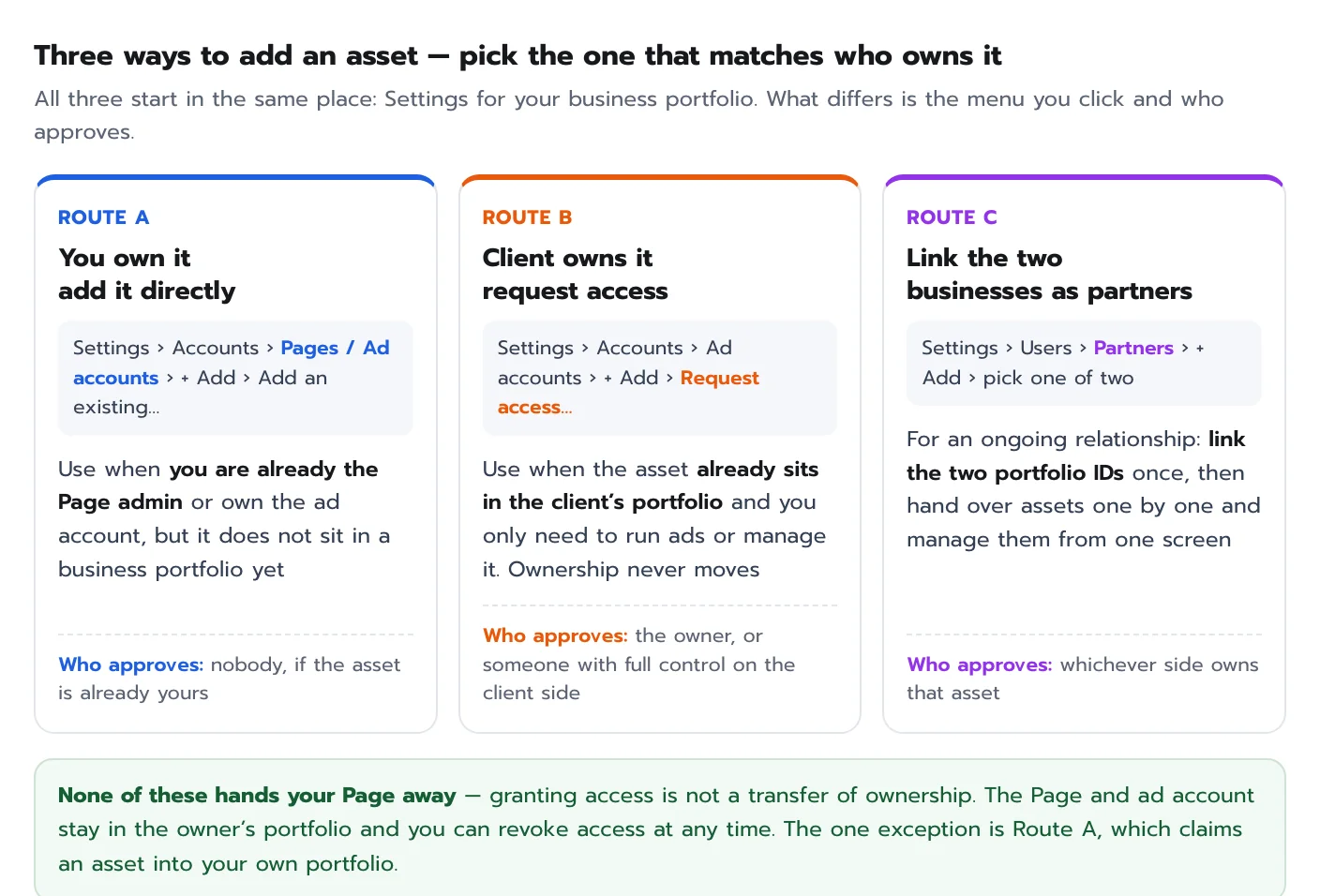
The most common misunderstanding is that letting an agency in means handing over the Page. It does not. Granting access opens a door; the Page and the ad account stay in the owner’s portfolio and access can be pulled back at any time. The only route where ownership genuinely moves is Route A, where you claim an asset into your own portfolio.
Route A: add a Page or ad account you already own
Use this when you are already the Page admin or the ad account owner, but the asset is not inside a portfolio yet. The one requirement: your account needs full control of that portfolio.
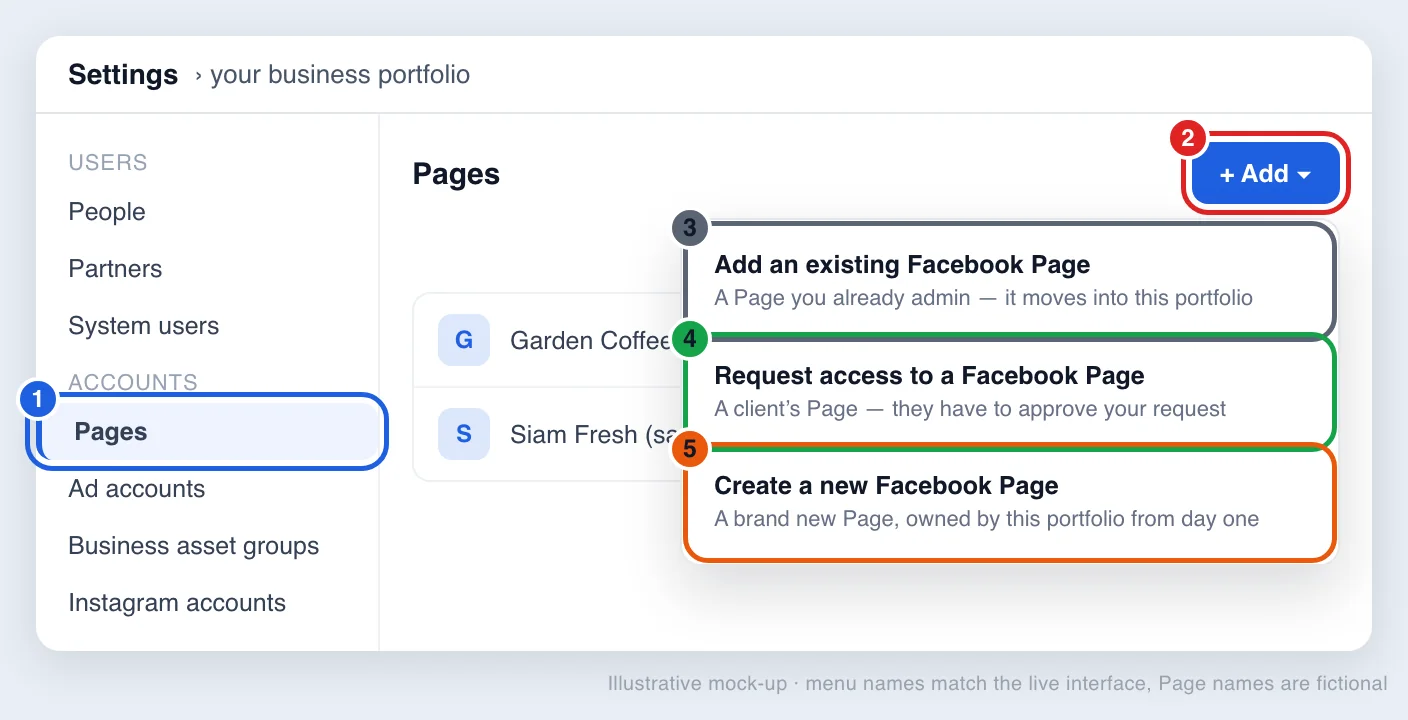
- 1Accounts = where assets liveSorted by type: Pages under Pages, ad accounts under Ad accounts. The steps are the same for every type.
- 2+ Add = the only button you needTop right of every screen in the Accounts group. It opens three choices.
- 3Add an existing… = claim your ownFor assets you already admin. The asset moves in and belongs to this portfolio.
- 4Request access… = ask for someone else’sFor a client’s asset. Nothing happens until their side approves.
- 5Create a new… = start freshThe new asset belongs to this portfolio from day one. Good for new businesses.
Picking 3 when you should have picked 4 is the number one reason requests stall — a client’s asset always needs option 4.
For a Page: go to Settings › Accounts › Pages › + Add › Add an existing Facebook Page, then type the name or paste the Page URL. Meta checks your admin rights for you, so if you already admin the Page it is done in one click.
Ad accounts need more care, because several steps cannot be undone. Meta spells this out in Add an ad account to your business portfolio:
- Once an ad account is in a portfolio, it cannot be moved out or deleted. Claim a client’s account by accident and you will not get it back easily.
- An ad account belongs to exactly one portfolio. If it already sits in the client’s portfolio, Route B is your only option.
- A brand new portfolio can create one ad account, rising to three once a campaign has delivered and a payment has gone through. The limit grows with ad spend.
- Closing an ad account does not remove it from the portfolio, and it still counts towards your limit.
Route B: request access to an asset in the client’s portfolio
When the asset already lives in the client’s portfolio, request access instead of claiming it. The steps Meta documents are:
- Open Settings › Accounts › Ad accounts
- Click + Add in the top right and choose Request access to an ad account in another business portfolio
- Enter the client’s ad account ID
- Choose the level you are requesting — partial access or full control. For partial access, tick only the tasks you need
- Click Confirm to send the request
The request lands on the client’s side, where it can be accepted by the account owner or by someone with full control of that portfolio — not by any Page admin. Once accepted, the ad account appears in your Ad accounts list while ownership stays with the client. Pages have the same option under Settings › Accounts › Pages.
Route C: link as partners, then hand over assets one by one
This is what agencies and long-term clients actually use. You link the two businesses once with an ID, and from then on you add or remove assets from a single screen instead of filing a request per account. The screenshot below is from M Creation’s own portfolio.
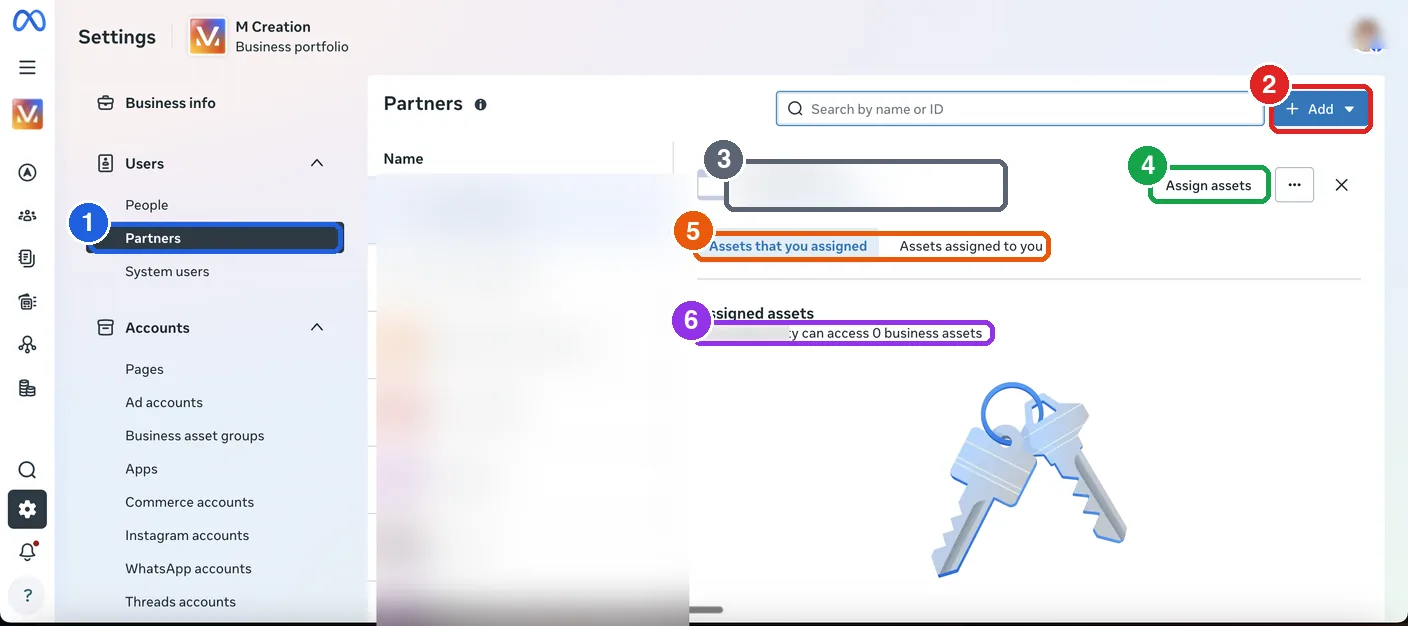
- 1Users › Partners = the partner roomIf you cannot see this item, your account does not have full control of the portfolio and the owner has to raise your access first.
- 2Add = connect to another businessOpens two directions: share your assets with them, or ask them to assign theirs to you.
- 3Partner ID = their portfolio numberEvery business has one. Only this number works here — an email address will not (blurred in the screenshot).
- 4Assign assets = hand assets overPick them one at a time: which Page, which ad account, and at what level of access.
- 5Two tabs = yours vs theirs“Assets that you assigned” is what you shared out. “Assets assigned to you” is what you received. Separate lists.
- 6The count line = your proof it workedStill showing 0 business assets means the businesses are linked but nothing has been handed over yet.
The ID (3) only opens the door. Assets reach the partner when you click Assign assets (4) and the number in (6) moves off zero.
Pick the right direction first
The Add button offers two options that are easy to mix up. The trick is to look at who owns the asset, not at who is doing the clicking.
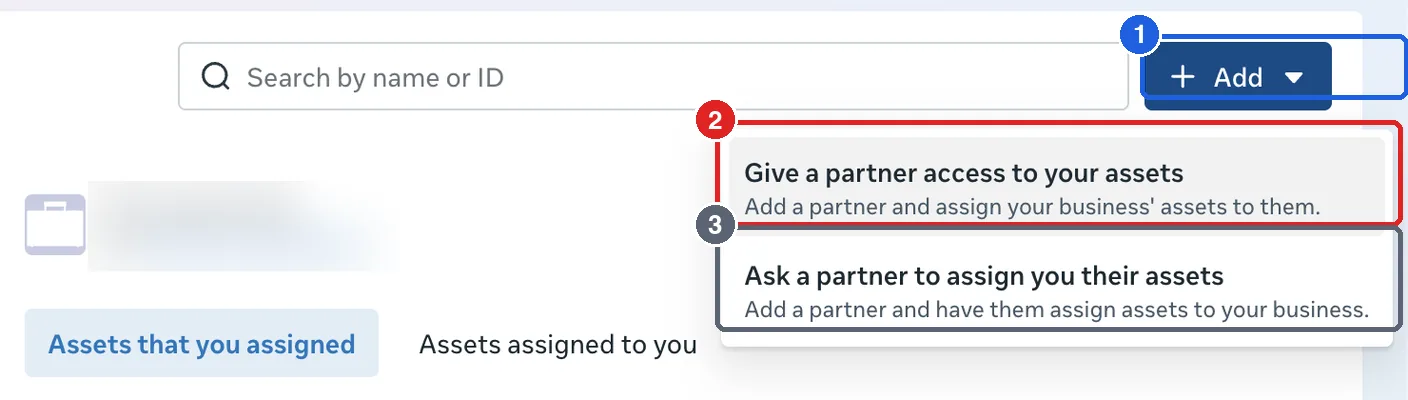
- 1Add = add a partnerThis button does not add an asset to your portfolio. It links your business to another one so access can flow between them.
- 2Give a partner access to your assetsChoose this if you own the Page or ad account and want an agency to work on it. Ownership stays with you.
- 3Ask a partner to assign you their assetsChoose this if you are the agency. Meta sends the request and the client approves it on their side.
Whoever owns the asset picks option 2. Whoever is coming in to help picks option 3.
Find the business portfolio ID
Both directions need the same number: the other side’s business portfolio ID. It is not the Page ID and not the ad account ID.
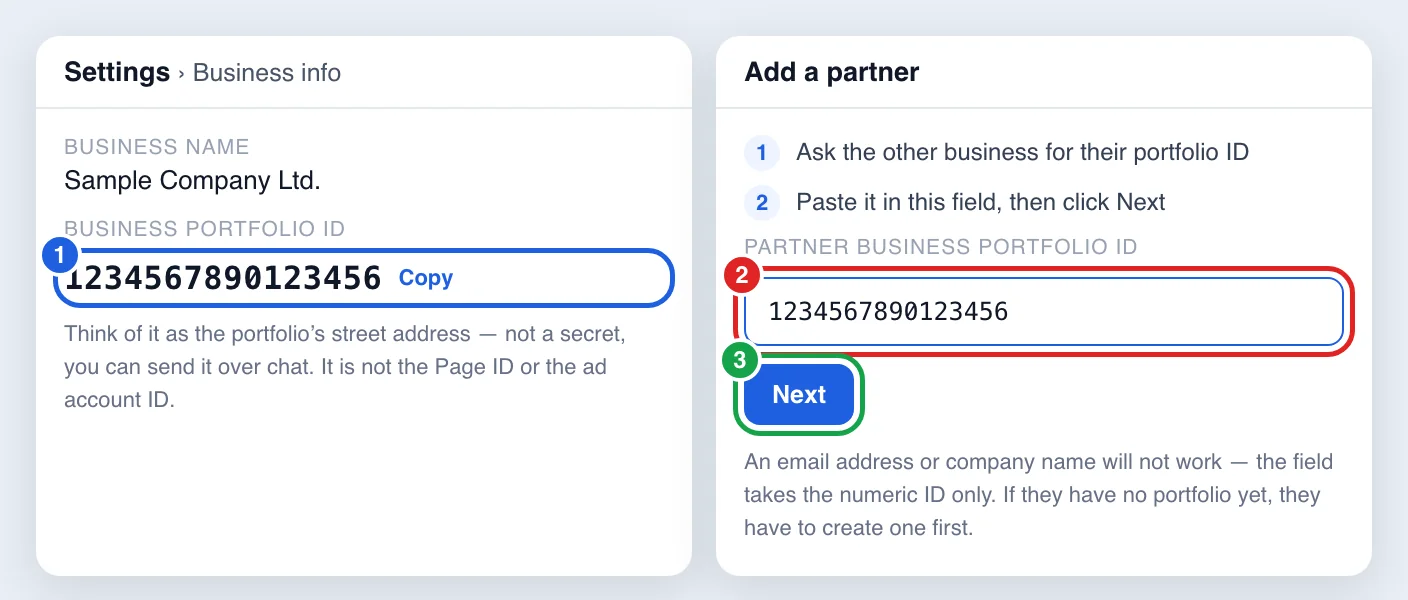
- 1The ID lives in Settings › Business infoSame place on both sides. It is not confidential — ask for it over chat.
- 2The field takes digits onlyCompany names and email addresses will not work. If the other side has no portfolio yet, they need to create one first.
- 3Next only links the businessesAt this point no asset has been shared. That happens in the next step.
Choose which assets, and how much access
This is the step that matters, and the one people forget. On the partner you just added, click Assign assets, then pick assets one at a time along with the level of access.
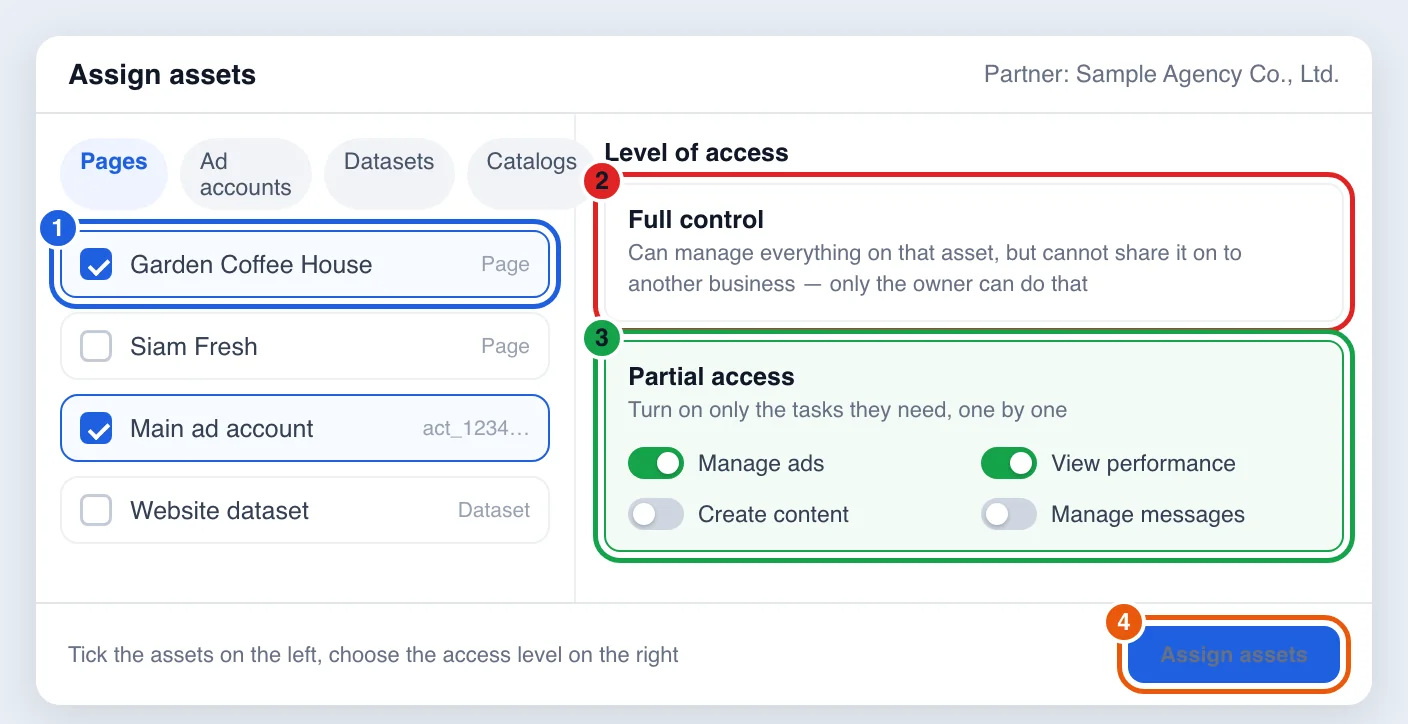
- 1Tick assets one at a timeYou can mix types in a single pass: Pages, ad accounts, datasets and catalogues.
- 2Full control = everything on that assetBut the partner still cannot share it on to another business — only the owner can do that.
- 3Partial access = only the tasks you pickFor example manage ads and view performance, without answering messages or publishing content.
- 4Finish with Assign assetsLeave this screen before clicking and nothing is shared, even though the partner already appears in your list.
Start with partial access and open only what that team actually uses. Adding permissions later is easier than chasing them back.
Worth knowing before you click, straight from Meta’s Give a partner access to business assets page:
- Only people with full control of the portfolio can share assets with partners
- Your partner needs their own business portfolio before they have an ID to give you
- Meta recommends turning on two-factor authentication for the portfolio first
- With partial access, the partner can only pass on the tasks you granted to people inside their business
- Sometimes another person with full control on your side has to approve before the assignment takes effect
Granted access, but still unsure whether the ads pay off?We run the ads and build the measurement behind them — from ad click through to closed sale, not just the numbers inside Ads Manager.
See our media servicesHow to check that it actually worked
Do not trust the partner name appearing in the list. Check these three things:
- The count line under the partner name has to show more than zero. “Can access 0 business assets” means nothing has been handed over.
- The right tab. What you shared out sits under “Assets that you assigned”; what you received sits under “Assets assigned to you”.
- Ask the other side to look. Both businesses see the shared assets in their own Settings. If they see nothing, the request is unapproved or no asset was assigned.
The four problems you will hit most often
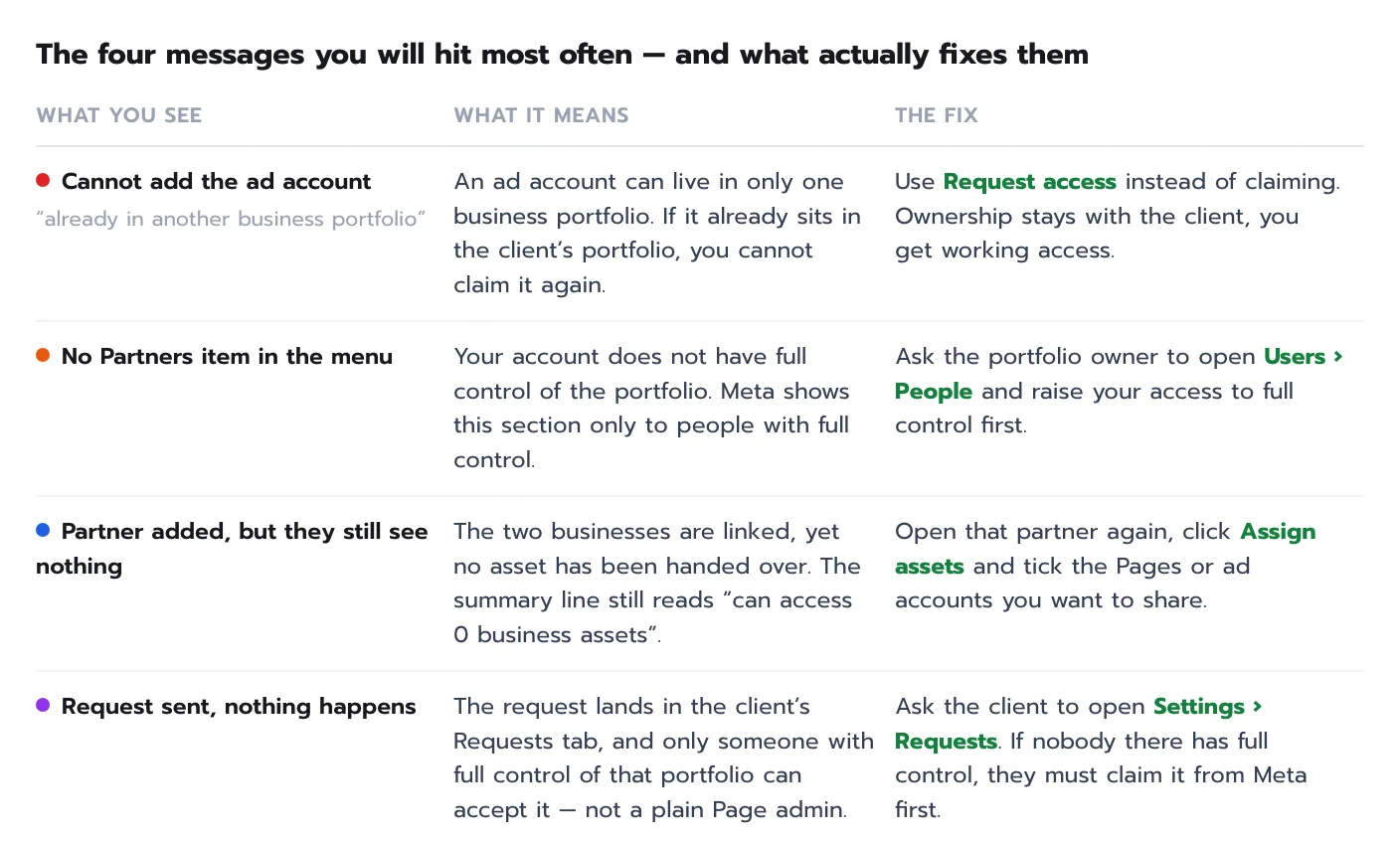
The last one is the hardest to solve. A typical case: a client has run a Page for years without ever creating a business portfolio, so when your request arrives there is nobody who can accept it. The fix is to have the client create a portfolio first, then go back to Route B or Route C.
Access is settled — now make the numbers trustworthy
Adding assets to a portfolio is a permissions job; it has nothing to do with measurement. Once the agency can reach the ad account, the next task is making the numbers in Ads Manager match real sales. That needs the website dataset in the same portfolio, server-side events through the Conversions API alongside the pixel, and one shared event_id so a single lead is never counted twice.
If your business closes deals over chat or by phone, the highest-value step is sending the outcome back from your CRM, so the platform learns which leads were worth having. We have written both setups up in detail in Thai: the Conversion API guide and sending CRM lead status back to Meta.
In short
Start with who owns the asset. Yours: add it directly under Settings › Accounts. The client’s: request access instead of claiming it. Working together long term: link as partners, then hand over assets with Assign assets. Remember that linking businesses and assigning assets are two separate steps — and grant the narrowest access that gets the work done, because widening it later is far easier than clawing it back.
If I give an agency access to my Page, do I lose ownership of it?
No. Sharing through Partners or Request access only lets them work on it. The Page stays in your business portfolio and you can revoke access at any time from Settings. Ownership moves only if the other side claims the Page into their own portfolio, which has to be done from an account that admins the Page.
Where do I find my business portfolio ID?
Open Meta Business Suite and go to Settings › Business info. The number sits under the business name. It is different from the Page ID and the ad account ID, and it is not confidential — you can send it over chat.
Why is there no Partners section in my Settings menu?
Meta shows that section only to people with full control of the business portfolio. Ask the portfolio owner to open Users › People and raise your access to full control, then the section appears.
I cannot add my client’s ad account — it says it is already in another business portfolio.
An ad account can belong to only one portfolio. If it is already in the client’s, use “Request access to an ad account in another business portfolio” instead of claiming it, and have the client approve. Ownership stays with them while you get the access you asked for.
I added the partner but they say they still cannot access anything.
Entering the ID only links the two businesses. Go back into that partner, click Assign assets, and select the Pages or ad accounts you want to share along with the access level. The line under the partner name then changes from 0 business assets to the number you shared.
Should I give an agency full control or partial access?
Start with partial access and switch on only what they need — typically managing ads and viewing performance. Add content publishing or message handling later if that is part of the scope. It is safer, and permissions can be widened at any time.
 Facebook
 LINE
LINE



 Chat on LINE